

Broadcast graphics for your league.
Scorebugs, lower thirds and lineups, controlled from your browser and added to OBS in minutes.
Not a generic template. The real game, on screen.
Every sport has its own scorebug, its own control panel and its own rules baked in — power plays, balls and strikes, downs and distance.
Hockey
Top-left corner scorebug, modelled on how the big broadcasts do it — slide-in animation, team-colour blocks and a live game clock.
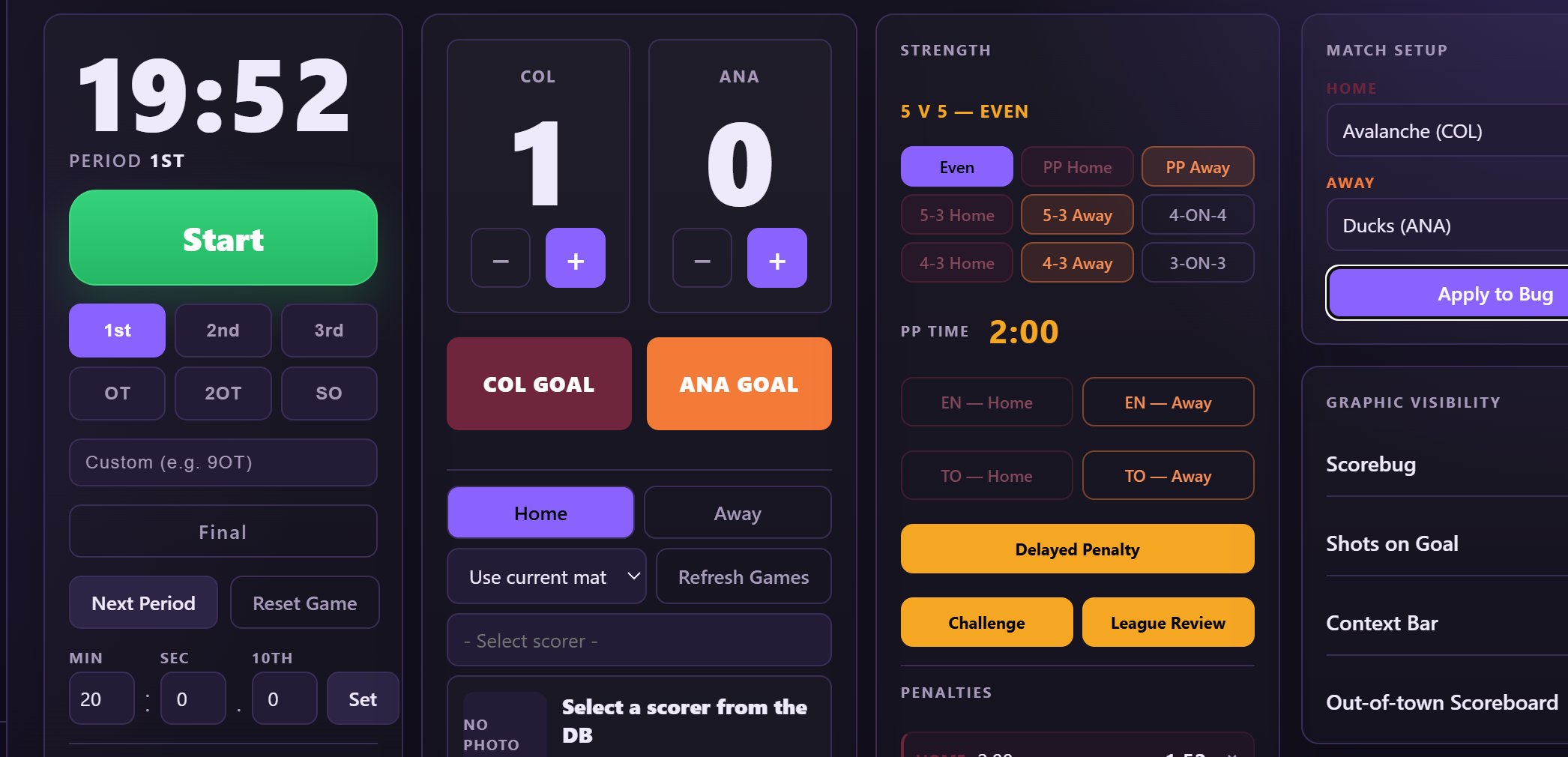
- Full strength tracking — 5v5, 5v4, 5v3, 4v4, 4v3, 3v3 and empty-net, with an animated power play clock that counts down on its own.
- Penalty manager — log penalties per team and let the graphic handle the rest, including delayed penalty styling.
- Shots on goal plus a switchable stat bar for shots, hits, attempts and more.
- Goal celebrations with scorer photo, number and season stats. Overtime goals auto-credit the game-winner.
- Challenge & League Review graphics, timeouts, extra text and a context bar for anything you need to say.
- Starting lineups, skater and goalie lower thirds (GAA, SV%), and a playoffs intro slide builder.
- Around the League out-of-town scoreboard — add the other games on tonight's slate and show scores on air.
- Periods through 1st–3rd, OT, 2OT, SO and a custom period box for 9OT marathons.
Baseball
An inning-by-inning bug that tracks the whole game state — and a control panel fast enough to keep up with a pitch clock.
- Balls, strikes, outs & bases with one-tap buttons. The inning readout flips to MID / END on the third out.
- Pitcher & batter lower thirds with AVG, OBP, RBI, ERA and WHIP, plus a live pitch count.
- HOME RUN animation, score tick-up and run flash — the moments people clip, handled.
- Review graphics — ABS challenge, coach's challenge and crew chief review, with Call Stands / Call Overturned outcomes.
- Full lineup board, "Batter Up" overlay, and a bullpen bar for who's warming.
- Box score view, context bar, and a "Final" that wipes the bug and centres the result.
- Team & roster manager — save your teams, colours and players once and reuse them every game.
Football NEW
Gridiron graphics with the situation front and centre — built to handle Canadian and American rules of the game.
- Down & distance and field position, with a possession indicator that sweeps and pops when the ball changes hands.
- Play clock with 20 / 30 second presets and +/- 30 second adjustments.
- Touchdown buttons per team, quarter controls and a game clock you can set by hand.
- Last-play / situation context bar for penalties, challenges and anything the crowd should know.
- Player lower thirds with photo, number and position.
- Your teams, your colours — build teams with logos and colours for any level, from high school to semi-pro.
The whole broadcast toolkit.
Not just a scoreboard.
The graphics your viewers expect from real TV, without a graphics operator, a truck, or a monthly bill that rivals your ice rental.
Animated scorebugs
Slide-in, score tick-ups, team-colour flashes. Tuned to feel like the networks, not a spreadsheet on top of video.
Lower thirds
Player, goalie, pitcher, batter, or any custom name and title. Photo, number, position and stats — slide on and off with one click.
Starting lineups
Build your lineup from your saved roster, then show the full board on air as the game opens.
Real clocks
Game clock, power play clock and play clock — all driven from the panel. Start, stop, set, nudge. Tenths when it matters.
Challenges & reviews
Dedicated graphics for hockey challenges and league reviews, and baseball ABS, coach's challenge and crew chief reviews.
Context bar
A flexible banner for the story of the game: milestones, injuries, sponsors, whatever you type. Show and hide on demand.
Playoffs intro slides
Build a slide-by-slide playoffs opener with your own title, subtext and logo. Step through it live or auto-play a sequence.
Your brand, your colours
Team primary and accent colours, logos and a broadcaster logo bug. Drop in your own league's logos and match every graphic to your jerseys.
Resolution & speed
Output at 720p, 1080p or 4K, and slow down or speed up every animation with a slider to match your show's pacing.
Live-updating, no refresh
The control panel and the overlay talk in real time. Hit a button and the graphic changes on stream instantly — no reloading browser sources, no second machine, no extra software. State is auto-saved, so a crash or a closed tab mid-game never costs you the score.
Graphic visibility
Every element has its own show/hide toggle, so you decide exactly what's on air and when.
Set it up once. Look pro every game.
Build your league's teams and rosters one time. After that, a lower third is two clicks — pick the player, hit show.
- Team profiles with name, abbreviation, logo and primary / accent colours that drive every graphic.
- Player rosters with photo, number and position for every team.
- Lower thirds in two clicks — pick a player, press show. Stats ride along when you want them.
- Starting lineups built straight from your saved roster.
- Stored locally on your machine — no accounts, no cloud roster to manage.
One control panel. Total control.
Runs in any browser, on the same computer as OBS or on a laptop at the end of the bench. Big buttons, dark theme, built for people who are also watching the game.
If you stream a game, this is for you.
Your league's livestream is the first impression for sponsors, parents and scouts. Make it count.
Leagues & associations
One look across every team and every game. Add your teams once, then every broadcast matches.
Junior & minor teams
Give your players the lower-third treatment, and give recruiters and families something worth sharing.
Independent streamers
Stand out from every other camera-on-a-tripod stream with graphics that make the product feel professional.
Schools & clubs
Student crews can run a full broadcast graphics package from a single browser tab. No training manual.
Pro features. Grassroots simplicity.
Broadcast graphics shouldn't need a production company.
No IT guy required.
One installer, one license key, and you're live. We built it this way on purpose.
Download & install
Run the Windows installer. It bundles everything it needs — no PHP, no servers, no extra downloads.
Launch & activate
Click the desktop shortcut. LineCastFX opens in your browser — enter your license key and pick a sport.
Add an OBS source
Add a Browser Source and paste the output URL the control panel gives you.
Go live
Set your teams, hit Apply to Bug, and start controlling graphics in real time. That's it.
Quick answers.
Anything missing? Ask — you'll get a reply from me, not a bot.
What do I need to run it?
A Windows PC and OBS (or any streaming software that supports Browser Sources). The installer includes the rest. The control panel opens in a normal web browser.
Does it work with Streamlabs, vMix or other software?
Yes — anything that can display a web page as a source can show LineCastFX graphics. OBS is the one I test most, but the overlay is just a transparent browser page.
Do I need to be online during a game?
Your license is checked online and cached, so a flaky arena Wi-Fi connection won't kill your overlay mid-broadcast, and everything else — teams, players, scores — is stored right on your own computer.
Can I use it for my own league, not just pro teams?
That's the whole point. Create your own teams, colours, logos and players, and they're saved for every game afterward. LineCastFX is built around your league, not anyone else's.
What sports are supported?
Hockey, baseball and football today — each with its own control panel and overlay. More are planned; tell me what you'd like to see.
What does it cost?
LineCastFX is in early access, and pricing is being finalised. Request access and I'll send details directly — early users get a say in how it's priced and what gets built next.
Can I get a feature or graphic added?
Probably. Because I build and support it myself, good requests from real users genuinely shape what ships next.
Your team deserves a broadcast that looks this good.
LineCastFX is nearing its public release. Request early access and be first in line — and help shape what comes next.